An introduction to TopoToolbox#
Welcome to the TopoToolbox Gallery, a collection of user-contributed demonstrations of TopoToolbox!
To begin, we will create a hillshade of a digital elevation model of Big Tujunga creek in California. Start by importing topotoolbox and pyplot.
[1]:
import topotoolbox as tt3
import matplotlib.pyplot as plt
The Big Tujunga DEM is provided as one of the example DEMs with TopoToolbox, so we can load it using the load_dem function.
[2]:
dem = tt3.load_dem('bigtujunga')
dem
[2]:
name: bigtujunga
        path: /home/runner/.cache/topotoolbox/bigtujunga.tif
        rows: 643
        cols: 1197
        cellsize: 30.0
        bounds: BoundingBox(left=376313.6554542635, bottom=3788627.8276283755, right=412223.6554542635, top=3807917.8276283755)
        transform: | 30.00, 0.00, 376313.66|
| 0.00,-30.00, 3807917.83|
| 0.00, 0.00, 1.00|
        coordinate system (Projected): EPSG:32611
        maximum z-value: 2295.0
        minimum z-value: 315.0
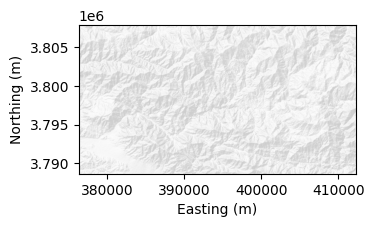
The DEM is returned as a GridObject, TopoToolbox’s representation of single-band raster datasets. To make a hillshade, we can use the plot_hs method on the GridObject. Instead of using TopoToolbox’s default colormap, we’ll use the ListedColormap from matplotlib’s colors module to produce a greyscale hillshade. We give it a single color of light grey to represent the lightest value, and plot_hs takes care of shading the rest of the DEM. Increasing the vertical exaggeration
a little, makes the relief more apparent.
[3]:
from matplotlib.colors import ListedColormap

fig = plt.figure(layout='constrained')
ax1 = plt.subplot(121)
dem.plot_hs(ax=ax1, cmap=ListedColormap([0.9, 0.9, 0.9]), exaggerate=3)

ax1.set_xlabel("Easting (m)")
ax1.set_ylabel("Northing (m)")
[3]:
Text(0, 0.5, 'Northing (m)')
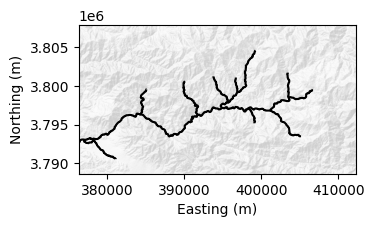
Now let’s add a visualization of the stream network to this map. We first create a FlowObject storing flow directions on the DEM, and then a StreamObject that picks out the streams. We call the klargestconncomps method on the StreamObject to restrict our analysis to the main watershed.
[4]:
fd = tt3.FlowObject(dem)
s  = tt3.StreamObject(fd).klargestconncomps(1)
We can add the StreamObject to our plot with its plot method.
[5]:
s.plot(ax=ax1, color="black")
fig
[5]:
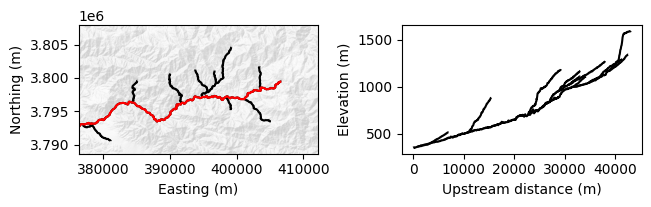
Finally, let’s use the trunk method on the StreamObject to pick out the longest stream in the watershed, and the plotdz method to plot its profile in another subplot.
[6]:
t = s.trunk()
t.plot(ax=ax1, color="red")

ax2 = fig.add_subplot(122, box_aspect=643/1197)
s.plotdz(dem, ax=ax2, color="black")
ax2.set_xlabel("Upstream distance (m)")
ax2.set_ylabel("Elevation (m)")

fig
[6]: